Raven is now inside the game: your own helper in Crypto of Thrones
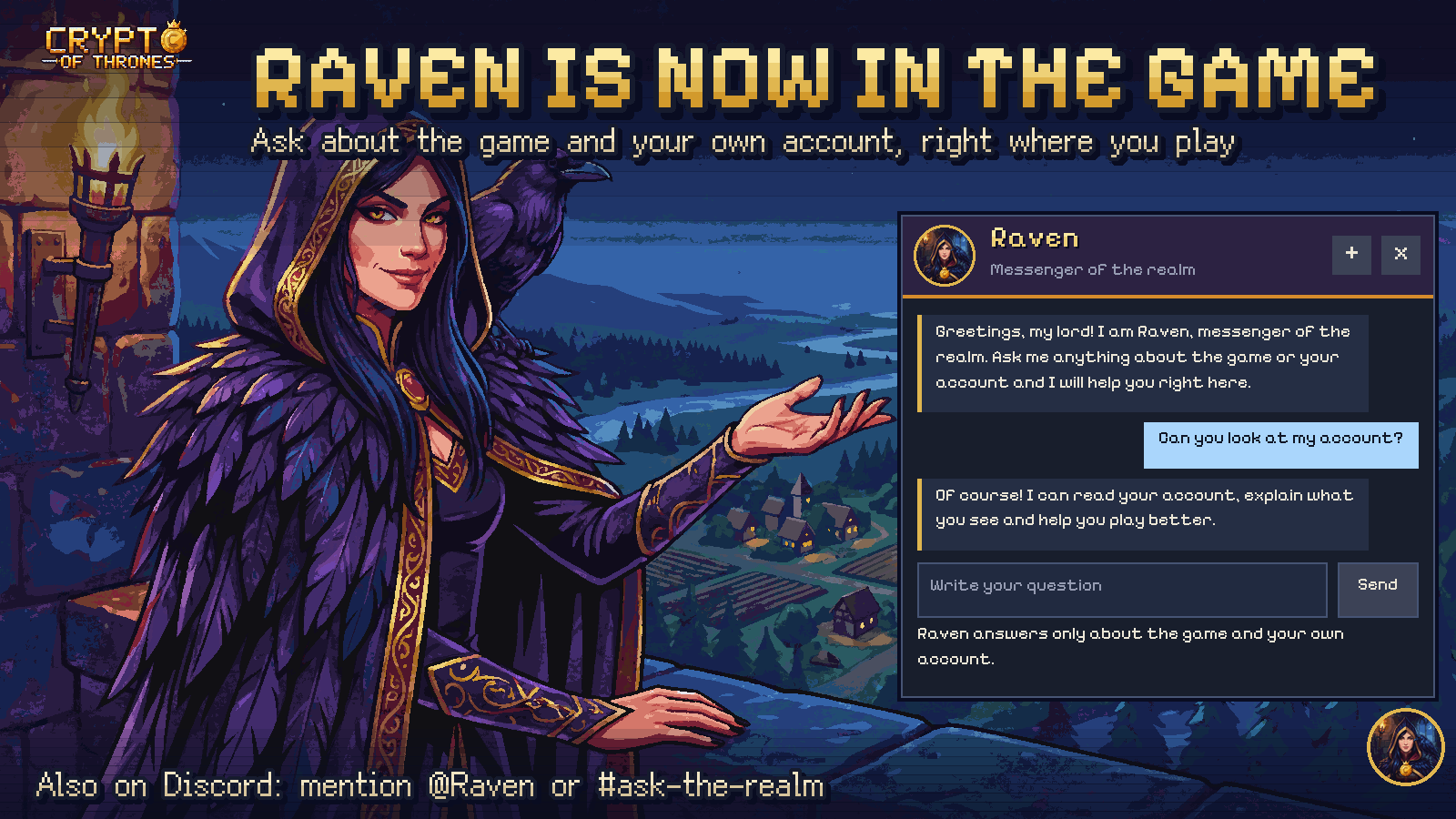
The same Raven who answers you on our Discord, when you mention her or ask in #ask-the-realm, now lives inside the game too.
The same Raven who answers you on our Discord, when you mention her or ask in #ask-the-realm, now lives inside the game too. And in the game she can do something new: she can read and understand your own account, clear up your doubts and help you play, right on the screen you have open.
Where to find her
Open https://play.cot.gg and sign in. Look at the bottom right corner of the screen: the round button with Raven's portrait is Talk to Raven. Tap it and the chat opens with Raven, Messenger of the realm. Sometimes a small bubble asks "Talk to Raven?" next to the button; you can close it whenever you like.
At the bottom of the chat you will always see the rule she follows: Raven answers only about the game and your own account.
The chat is open to every signed-in player whose game account is at least one day old. Brand new accounts can already ask Raven on Discord while they wait.
What she can do
- Explain the game: heroes, mercenaries, farming, energy, dungeons, PvP, the Shop, withdrawals, events and every other part of the realm.
- Read your own account: your balances in the game, your progress, your energy, your recent activity, your purchases, your invites, your linked accounts, your withdrawals, your boats and your pass.
- Follow your support case: if your game account is linked to Discord, she also sees your own open support ticket, bug reports and suggestions, so you do not have to explain everything again.
- Speak your language: she answers in the language of your game, in all 11 languages of the realm.
She sees where you are
Raven reads the screen you have open and what you are doing there. Ask from the Shop and she knows you are in the Shop; ask from a dungeon or from the hub and she answers about that place. Together with your own account data, this lets her point to the exact button or step you need, without you having to describe everything first.
What you can ask her
- "How much does a Mythic MINT10k farm per day?"
- "Why is my energy low, and when does it come back?"
- "Where is my last withdrawal?"
- "Did my friend's invite count for me?"
- "What did I buy in the Shop, and did it arrive?"
- "What does this screen do?"
- "What is the status of my support ticket?"
- "Is my Discord account linked to the game?"
How she reads your account, and what she never sees
- Only your own account. The game server tells Raven who you are from your signed-in session. The page never sends a wallet or an account name, and no message can make her read, describe or compare anyone else's account.
- No keys, no seed phrase, no passwords. Raven never asks for your seed phrase, your private key or any password. If anyone asks you for them, it is a scam.
- She cannot move anything. Raven cannot send, credit, refund, unlock or reset tokens, items or rewards, and she never promises them. No message can change that, even one that claims to come from the team.
- No payments. Raven never asks you to pay or to send anything to anyone.
- Verified answers. She answers only what she can back with the game's knowledge and your account data. When she is not sure, or your case needs a person (a missing item, a payment, a decision), she says so and hands it to the team.
- Your words stay private. Our records of the chat keep no text of your messages or of her answers.
When she can't answer: open a ticket
Raven never guesses. When she cannot answer your question with certainty, she tells you so and asks you to open a support ticket on our Discord, with the link to the support channel right in the chat: https://discord.com/channels/1569816950736166912/1569834847730540668. There the team takes over your case in private.
When the team needs to step in
When Raven hands your case to the team, the chat shows the button Send to my ticket. Press it and she posts a summary of your conversation in your own support ticket on Discord, or opens one for you. She never does this on her own. To use it, your game account must be linked to Discord; if it is not, the chat shows Link Discord first.
The same Raven on Discord
On our Discord server, Raven answers when you mention her or when you ask in #ask-the-realm. Questions about your own account are best asked in the game chat or in your private support ticket, never in a public channel. And remember: the team never sends you a DM first.
Tips
- One question per message works best. Messages can have up to 600 characters.
- She accepts one message every 3 seconds, with an hourly and a daily limit. If you reach it, come back a little later.
- Press + (New conversation) to start over on a new subject.
- Open the screen your question is about before you ask: her answer will point to what you see there.
Open the game at https://play.cot.gg, tap the raven in the corner and say hello. More about the realm at https://cot.gg. 👑
Update, November 28: Raven in the game just got better
- She reads your account from your signed-in session and answers balance and account questions right away.
- She sees the screen and the tab you have open, so you can just ask "what do I do here?"
- Only if she really cannot solve it, she sends you to the team in #support.
- Welcome message in all 11 game languages.
- Bigger chat window.
Update 2, November 28: more Raven in the game
- She now reads your screen in detail: timers, buttons, checklists, Shop offers and any error you see, so she knows exactly where you are stuck.
- She remembers your game chat inside your own private ticket in #support, so you never have to explain twice.
- Ask her when a roadmap feature opens and she tells you the date.
- The chat takes normal conversation text only, no links, and tells you why if a message is refused.